AI bug trackerfor Next.jsauto-create GitHub issues
Drop-in Next.js SDK. Converts messy stack traces, fragmented screenshots, and vague user complaints into precisely structured GitHub issues.
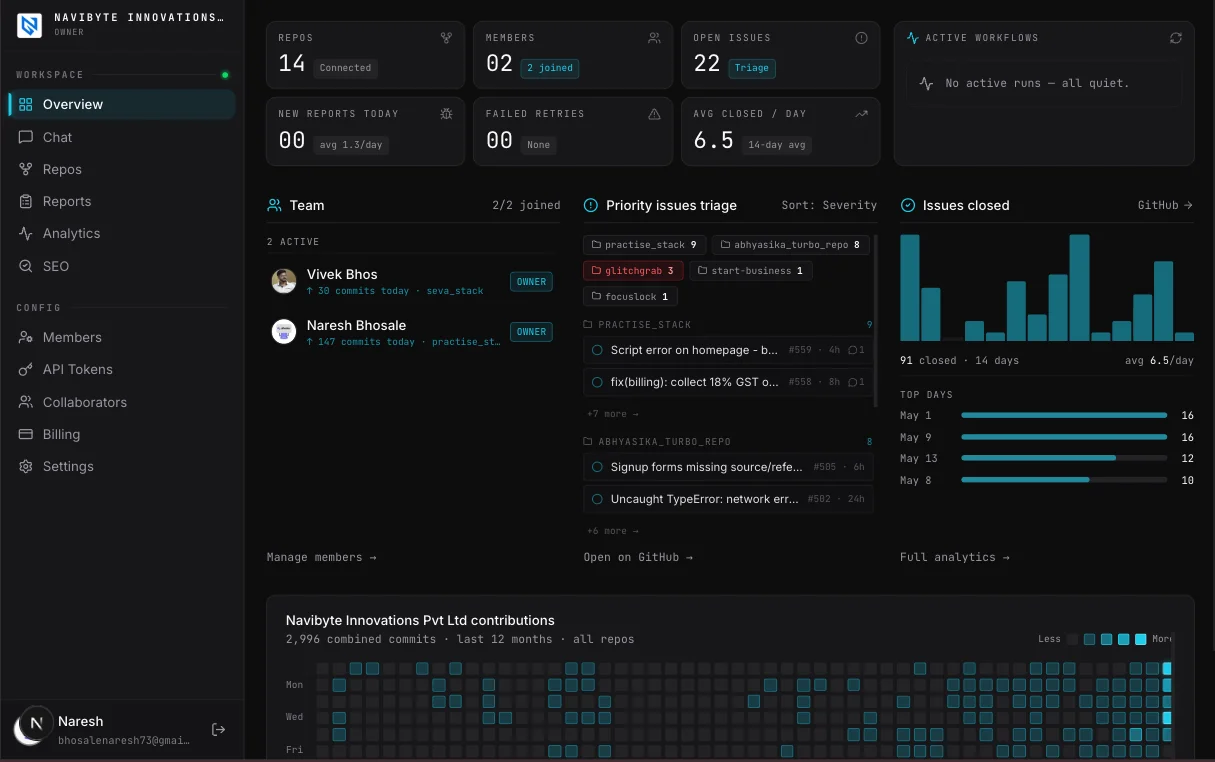
// dashboard preview
organize your work and org
one place for every bug, issue, and team member — no context switching
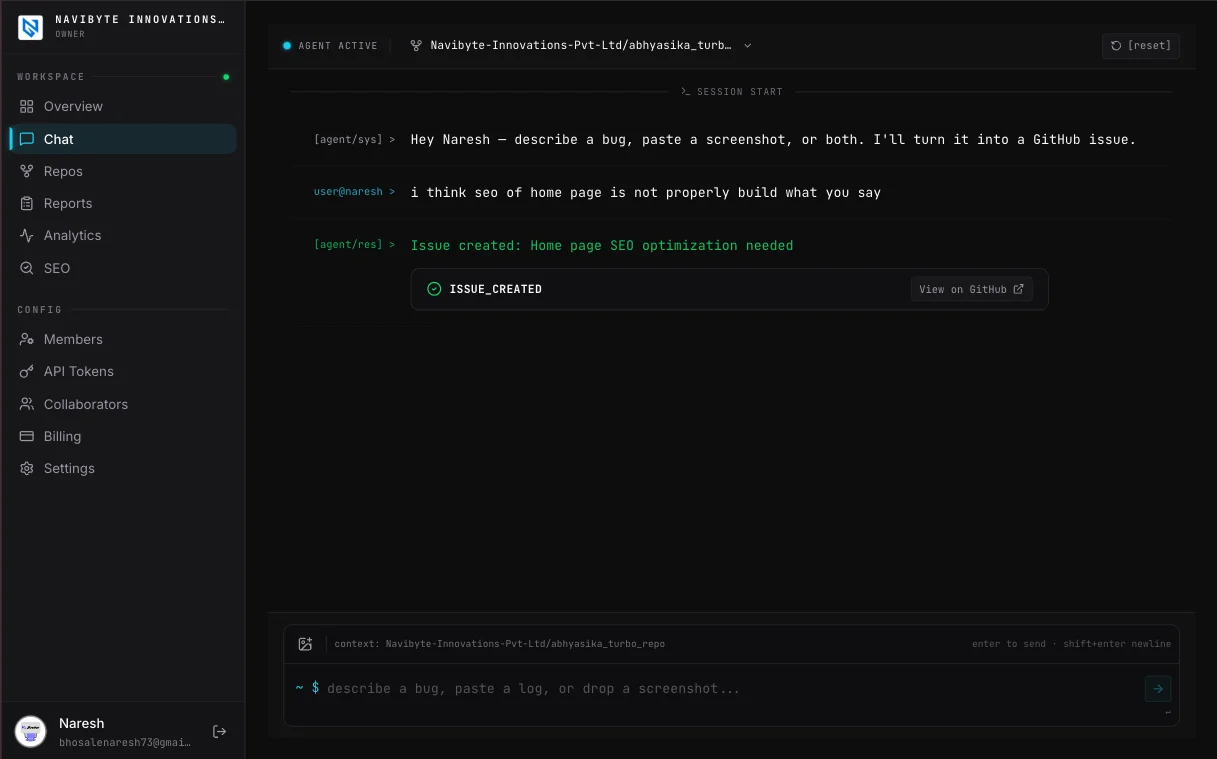
describe the bug.
we write the issue.
Drop a screenshot or type what's broken. Glitchgrab files it as a GitHub issue on the repo you pick — screenshot attached — in seconds.
- paste a screenshot or describe in plain text — no templates
- optional AI enhance tidies your wording — it never invents details
- pushed directly to GitHub — no context switching, no copy-paste
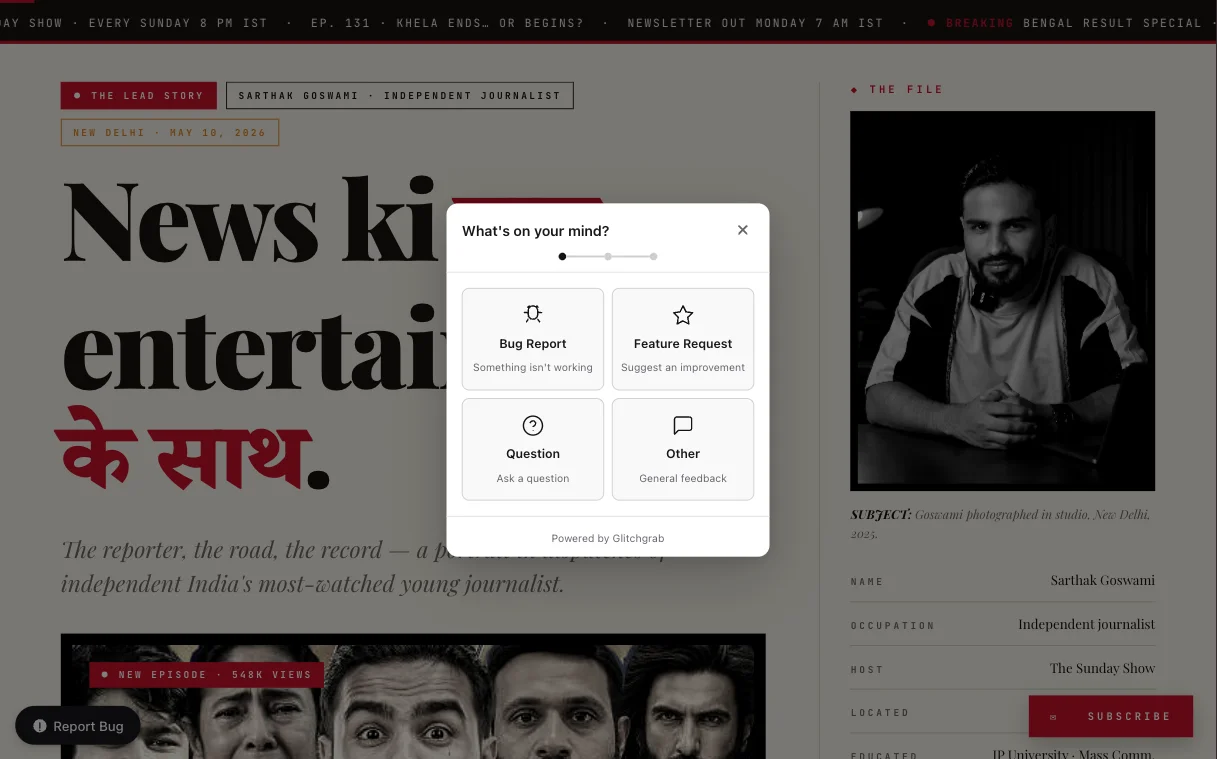
one click.
straight to github.
Hit the report button or press ⌘ Shift G / Ctrl Shift G. Screenshot captured, issue filed. No digging through code, no copy-pasting context.
- report from anywhere in your app — button or keyboard shortcut
- screenshot auto-attached — no need to explain what you're seeing
- lands as a GitHub issue instantly — page, browser and recent steps attached
all your repos. 🗂️
one plan. forever.
Track personal repos, org repos — no limits, no per-seat pricing. Buy once, your whole team just logs in. 🚀
- 🗂️personal + org repos all in one place — tracked, synced, ready
- 👥team members just login — no extra seats, no extra cost
- ♾️unlimited repos, unlimited members — one flat plan
Lock in lifetime unlimited access — unlimited repos, unlimited members, forever. No renewals, no future price hikes. 🔒
claim your spot →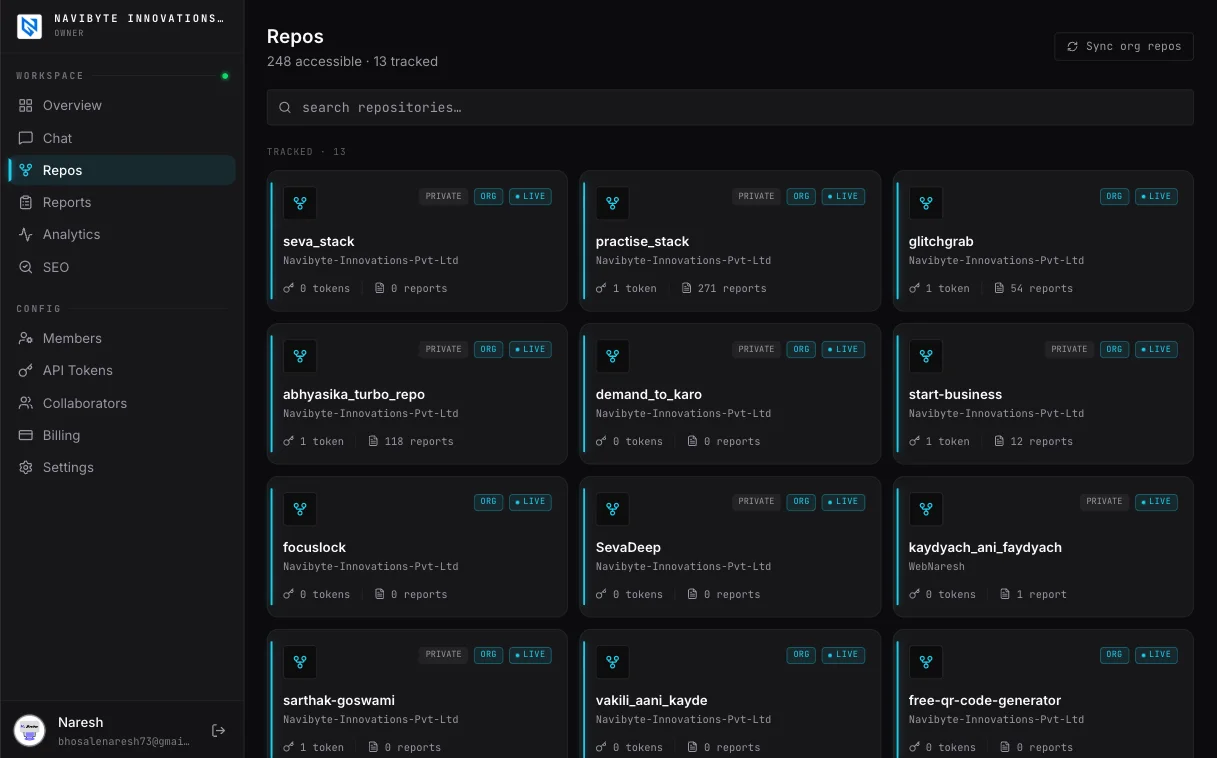
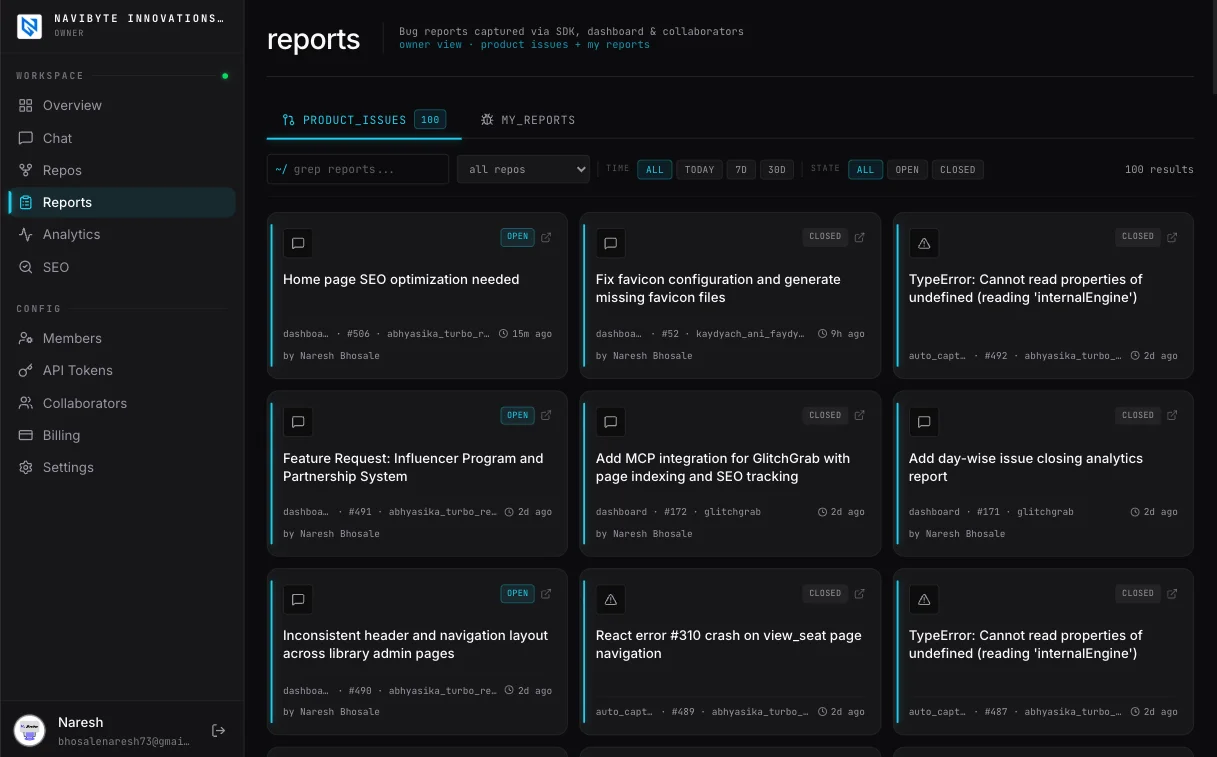
see what's broken.
before your users do.
Every report, every issue — tracked in one place. Understand exactly how your product is behaving in production without digging through logs.
- every bug report linked to its GitHub issue — full traceability
- see patterns — which pages break most, which errors repeat
- know your product health at a glance — no context switching
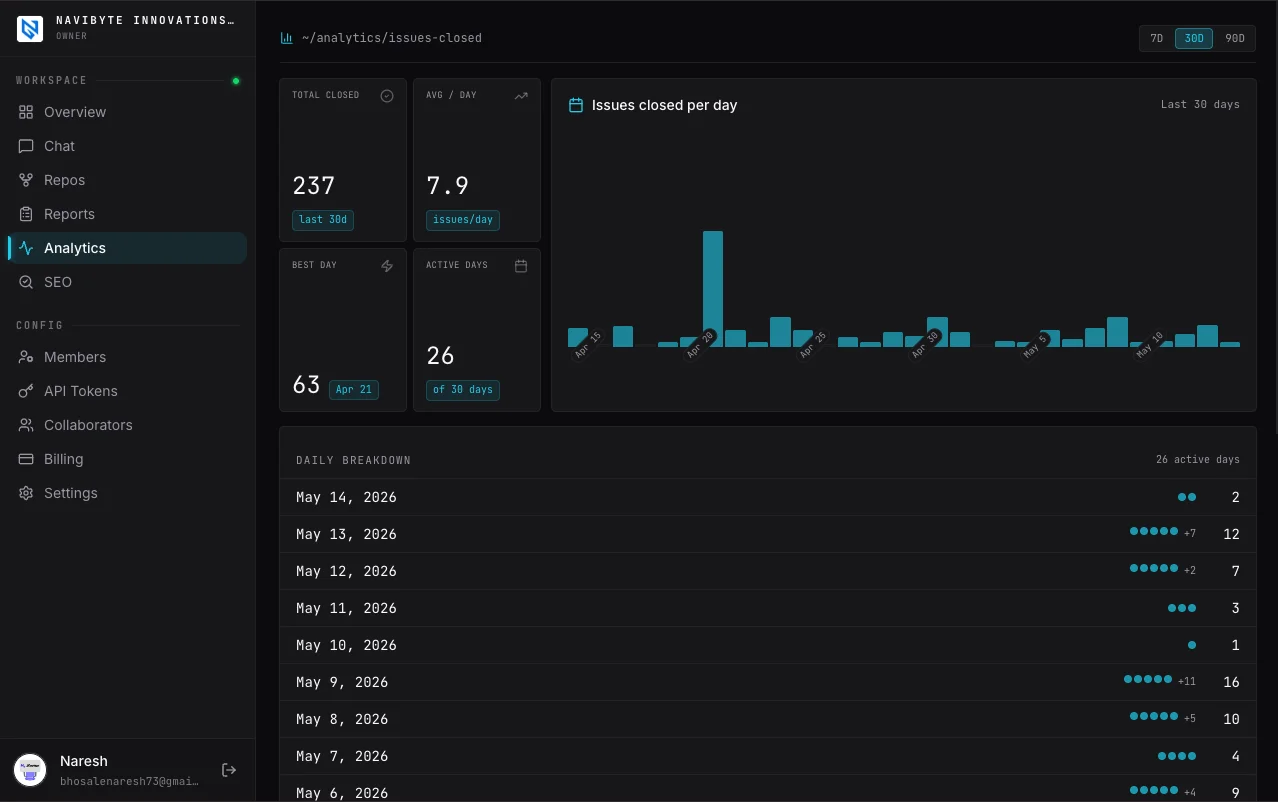
understand your team.
issues closed, not just opened.
See exactly how fast your team resolves bugs — across every repo, every org member. Spot slowdowns before they pile up.
- issues closed per day — bar chart, hover to inspect by repo
- best day, avg velocity, active days — all in one view
- switch between 7d, 30d, 90d — no config needed
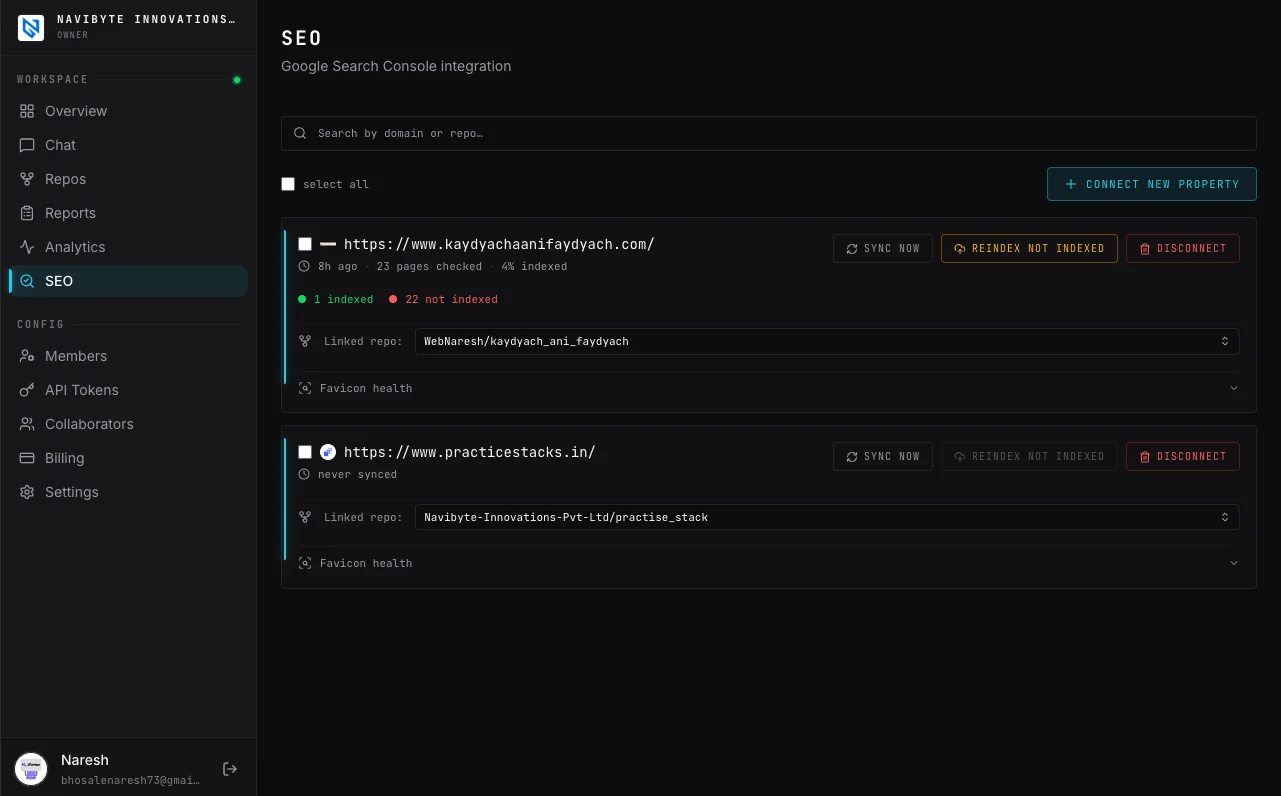
one place for all your seo.
every domain. every org.
Manage SEO across all your projects and domains from a single dashboard — meta tags, sitemaps, structured data, and more. No more jumping between tools.
- all domains in one view — personal projects + org repos
- meta tags, OG images, sitemaps — managed without touching code
- structured data auto-generated — schema.org out of the box
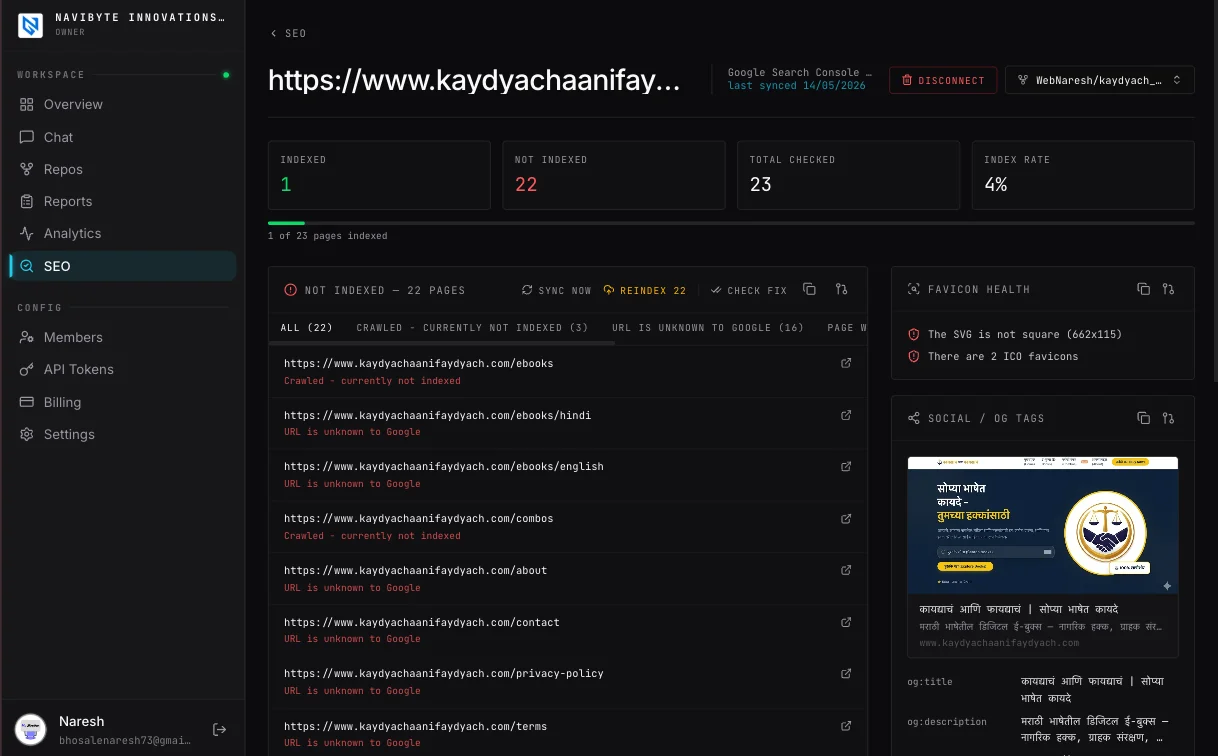
see exactly what google sees.
fix it before it costs you.
Connect Google Search Console and get a full indexing report — which pages Google crawled, which it skipped, and why. Reindex with one click.
- indexed vs not-indexed — grouped by crawl reason
- favicon health + OG tag audit — auto-checked on every sync
- one-click reindex — submit pages directly to Google
everyone around your product
hears what happened.
A bug report is a conversation with five kinds of people: the user who hit it, the developer fixing it, the tester checking it, you, and the prospect who hasn't signed yet. Glitchgrab messages each of them on WhatsApp at the moment it matters. Nobody has to install an app or log in.
- Only when there's something to do. No "0 issues today" messages.
- Reply "skip today" to pause the day's reminders.
- Updates only. Never promotions.
Glitchgrab
business account
Update on your report
Hi Rahul, your report “Discount not applied to active subscription” to Acme Billing has been picked up and the team is now working on a fix.
What you reported: The 10% discount code is accepted at checkout, but the next invoice on an active subscription still charges the full price.
Contact Vivek on WhatsApp at +91 98765 43210 to share more details, screenshots or steps to reproduce.
4:12 pm
for people who report bugs
Your users stop wondering whether anyone read their report.
The team is on itnew
The moment a pull request picks up their report. One tap chats with the developer; another sends screenshots straight onto the issue. Sent by email too.
It's fixed. Did it work?
About 10 minutes after the fix goes live. One tap confirms it, or reopens the issue.
for your developers
The right person hears first, with enough to decide now or after lunch.
Assigned to you
When GitHub assigns an issue. Repo, severity and type included.
Reporter says it's not fixed
When a reporter taps reopen, with their number to call.
QA says it's not fixed
When a tester fails the fix. It's already reopened.
for your QA testers
Testers need no GitHub account. Every link signs them straight in.
You've been added
When you invite them. Opens their verification queue.
Fixes ready to verify
Once a merged fix is live, with the issue numbers.
Evening check-in
Only on a day fixes are waiting and nothing was verified.
Your video is ready
When the editor uploads a cut of a video you asked for. One tap to watch, comment and approve.
for your video editors
Editors need no GitHub account. They hear about a request, and when it is due.
New video request
When a request lands on their project, with the project, title and due date.
Video due
The day before and on the due date, until a cut is uploaded. Skip today pauses it.
for your sales reps
What the client asked for on a demo becomes an issue the same day.
Demo notes are readynew
Minutes after the call is summarised. One tap shows the notes and the client's requirements, and any requirement becomes a GitHub issue with the client's words and the call time.
for you and your leads
Where the backlog stands, without opening a dashboard.
Morning digest
08:00 IST. Open issues by repo and what's assigned to you.
Evening recap
19:00 IST, only on a day something actually closed.
Weekly recap
Monday morning. What each developer resolved.
GitHub access lost
If Glitchgrab loses a repo. Reports are kept and filed later.
Daily report, to the app ownernew
20:00 IST. Add your client as an app owner and they get today's issues created, sent for verification, verified and demos booked on their apps, no login needed.
for prospects booking a demo
Book from your site or over WhatsApp, and nobody forgets the call.
Demo confirmed
Right after booking, with a Join button and Reschedule.
Starting soon
30 minutes before, to them and to you.
New lead
When a prospect leaves their details on your site, to you and sales. Once per number.
Follow-up call due
5 minutes before a customer call you booked, with the last note. Call now rings them from your Glitchgrab line.
Keep the next call?new
After a customer call, Glitchgrab books the next one from what was said and asks whoever called. Yes keeps it, No removes it.
Issues from your callnew
After a client call, if your project has auto drafts on: how many possible issues it found, with anything already being worked on left out. Read each one and file it right there in the chat.
Missed callnew
When someone rings your Glitchgrab line and nobody picks up, with who it was. Call back rings them from the line.
how to switch it on
Add and verify your WhatsApp number in settings, and ask your team to add theirs. Reporters' numbers and emails come from the session you pass to the SDK.
cli install transcript
demo.mp4 · 45s
From Screenshot to Shipped
//“once a developer, always a developer” — even on vacation, you're shipping.
Spot. Snap. Drop.
You're on a beach. A competitor's page ranks for something you care about. Screenshot it. Jot a quick thought. Drop it in Glitchgrab. That's it — go enjoy your vacation.
Filed for you.
Glitchgrab files your screenshot and note as a GitHub issue on the right repo — screenshot attached, nothing to retype. Turn on AI triage and it also gets a label for the kind of problem.
Open. Work. Ship.
Open Claude Code. Check your Glitchgrab dashboard. The issue is waiting — structured, prioritized, ready to implement. Vacation well spent.
>What is Glitchgrab?
Glitchgrab is a hosted tool that turns production errors, user-submitted screenshots, and vague bug reports into well-structured GitHub issues. It ships a Next.js SDK, a Chrome extension, a Google Meet call recorder, and an MCP server for Claude.
>Which versions of Next.js does Glitchgrab support?
Glitchgrab supports Next.js 13, 14, and 15 with full App Router compatibility.
>Is Glitchgrab free to use?
Yes. The free tier includes unlimited reports and one GitHub repository. The Pro plan at ₹199/month unlocks multiple repositories and bring-your-own-key (BYOK) support for OpenAI or Anthropic.
>How does deduplication work?
Repeated production errors are grouped by a signature of the error message and the page it happened on. A crash loop files one issue, not hundreds — later occurrences are added to the open issue as a comment instead of opening a duplicate.
>Can I self-host Glitchgrab?
No. Glitchgrab is a hosted service run by Navibyte Innovations at glitchgrab.dev — there is nothing to deploy or maintain. You install the SDK, and issues are filed into your own GitHub repository.
>How do I get started?
Sign in at glitchgrab.dev/login with GitHub, connect a repo and create a gg_ token. Then run bun add glitchgrab and wrap your root layout with GlitchgrabProvider. The SDK reference is at glitchgrab.dev/docs; step-by-step guides for the Chrome extension, QA testers, call recording and MCP are at glitchgrab.dev/guides.
Bugs, demos, and the calls in between.
Glitchgrab turns what happens around your product into GitHub issues and searchable records. Errors in your app become issues automatically. Anyone can file a bug from any page with a keyboard shortcut, screenshot attached.
It also schedules and records your client calls. Connect your Google Calendar and prospects can book a demo from your own website or over WhatsApp, choosing from times you are genuinely free. Glitchgrab creates the event on your calendar with a Google Meet link and invites them. A notetaker joins the call, records it, and files the transcript against the right project.
Your calendar is read only to work out your availability and to manage the demos booked through Glitchgrab. We never modify or delete anything we did not create, and never touch anyone else's calendar. Full detail is in our privacy policy.
Got questions? Talk to us.
Feature request, feedback, partnership — we read every message.