Team and QA
Add a QA tester
Add a QA tester with no GitHub account, assign their repos, get them signed in, and how they verify fixes with Pass or Fail
Steps checked November 4, 2026
A QA tester is someone — often on your client's staff — who checks fixes and reports bugs without a GitHub account. They sign in with their phone number, see only the repos you assign them, and verify each fix with Pass or Fail.
The same panel adds a sales rep (someone who runs demos and needs the calls, not the fixes) and a video editor (someone who makes the demo videos your team asks for, in GlitchRecord). One person can hold several roles.
Before you start
- You are the org owner.
- You have the person's mobile number (Indian +91 numbers — the sign-in code is sent by SMS).
1. Add the tester
- Open Members in the left sidebar and go to the Testers, sales reps & editors section.
- Press Add tester. The Add a tester, sales rep or editor panel opens.
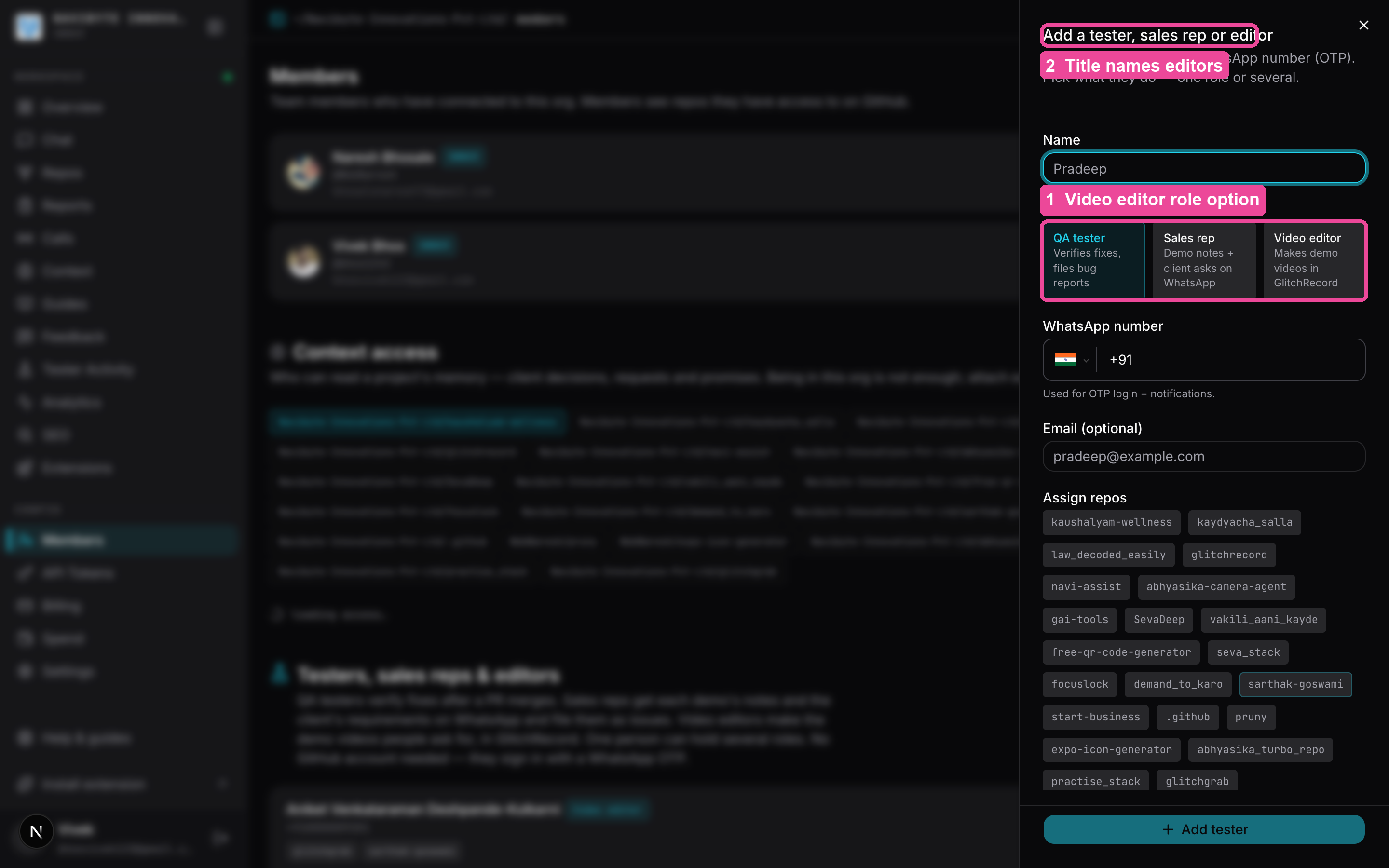
- Fill in:
- Name (required)
- Role — QA tester, Sales rep, Video editor, or any mix. QA tester is ticked to start with; at least one must stay ticked.
- WhatsApp number — Used for OTP login + notifications.
- Email (optional) — for a sales rep, use the address they are invited to demos with: it is how Glitchgrab knows a calendar demo was theirs.
- Under Assign repos, tick every repo this person should test. They will see nothing else.
- Press Add tester (it reads Add sales rep or Add video editor when only that role is ticked). You will see Tester added, Sales rep added or Video editor added.
Each person's row shows a QA tester, Sales rep and/or Video editor chip.
2. Get them signed in
Either:
- Send the QA link — on the tester's row press Copy QA link (QA link copied) and send it to them. Opening it signs them straight in. Treat it like a password — anyone with the link is signed in as that tester.
- Or let them sign in by phone — they go to glitchgrab.dev/login, choose the Tester tab, enter their number, press Send code by SMS, type the code and press Verify and continue.
A QA tester also gets a WhatsApp welcome when you add them. A sales rep or video editor does not — send them the link or point them to the phone sign-in. A video editor signs in inside GlitchRecord instead (see below).
3. Change a tester later
On the tester's row:
- Edit → change their details, role or assigned repos → Save changes.
- Trash icon → Confirm to remove them.
Turning QA tester off removes the fixes still waiting for that person to verify. Verdicts they already gave stay.
Assigning repos happens only here, on Members → Testers, sales reps & editors. The Tester Activity page only shows what testers have done.
What the tester sees
After signing in they land on their own dashboard with:
- Overview — what is waiting for them, what they verified, and Issues filed: every issue created on their projects each day over the last 14 days, and how many today.
- To verify — fixes to check. Each card says who reported the bug and which developer fixed it (reported by … · fixed by @…), and the table view has a Reported by column. Each card has Pass and Fail. Click a fix's title to open its panel: The request (or The bug) — what was reported, with its screenshot — then From the developer: what changed, where to find it and how to test it, when the developer wrote that. With no note from the developer, a What to test box says so instead: try the request the way it was reported, and press Ask developer if you are not sure what changed. Show full issue has the rest, and GitHub ↗ in the panel's header opens the issue on GitHub. At the bottom: Pass (optionally attach a screenshot or file of the testing and add a Note for the developer saying what you checked, then Confirm pass — the note goes on the GitHub issue with the pass), Fail (say what is not working, optionally attach a screenshot or file, then Confirm fail), Skip, Ask developer (a question posted on the issue), or Flag to come back to it later. A screenshot or file is optional on Pass and Fail: with none attached, the GitHub comment says No screenshot attached. Pass, Fail and questions each take up to 5 attachments — screenshots, or text files such as a saved .html page: paste a screenshot with ⌘V / Ctrl+V, drop a file, or choose files. Click Draw on an attached screenshot (or the screenshot itself) to circle or mark the problem, then Save annotation; the marked picture is what gets posted. On the GitHub issue an .html file opens as the page itself, in a safe sandboxed viewer. After Pass, Fail or Skip in the panel, the next fix in the list opens on its own (… · next fix opened), so a tester can work through the queue without closing the panel. A follow-up fix shows the issue it follows under its title, with that issue's verdict — for example follows up #620 · passed: click it to read that issue in the same panel, then Back to the follow-up.
- A fix that holds several reports on one page (title like [/dashboard/projects] 4 reports) shows Verify each 0/4 instead of Pass and Fail. In its panel each report has its own Pass and Fail, with its own note and screenshot, and the top says 1 of 4 verified. Show report under each one shows what that reporter wrote. Under it, always visible, sit that report's own proof: the developer's What changed and before/after pictures for that report, and its own From the developer note when the developer posted one comment per report (a comment starting Report 2 only:). Each report's proof comes from whichever comment holds it, not only the newest, so you compare one report without scrolling past the others or hunting through the comments. The fix stays in To verify until every report has a verdict: if any report failed, the fix fails; if all passed, it passes and the issue closes. Skip still skips the whole fix.
- Split a bundled fix. Press Split into separate cards under the report list in the panel to give each report that is still waiting its own card in To verify (shown as #N.1, #N.2 …), each with its own Pass and Fail. Verdicts already given are kept, and new reports on that page stop being grouped. The project owner can group that page again from the chip on the repo's card in Repos.
- Video requests — demo videos the team asked for. To ask for one, open Report, pick Video script and describe the video, or paste a script if you have one. An editor writes the script with Claude from the code. When the editor uploads a video, the row shows v1 · review: open it, play it, pause where something should change and Add comment (it is pinned to that second). When it is right, press Approve video — that closes the request. Only the person who asked can approve.
- My reports — every issue they filed, with its status (Open / Working / Fixed) and the team's replies. See Report a bug as a tester.
- History — what they have verified, with the note or fail reason they wrote shown under each. Click one to read it again in the same panel, read-only.
- Calls — recorded calls on their repos.
- Report bug in GlitchRecord — file a new bug from the desktop app. See Report a bug as a tester.
What a sales rep sees
A sales rep who is not also a QA tester sees only Calls. No fixes to verify, no QA reminders.
- On a call, Client requirements lists what the client asked for, each with Create issue. See Read a call's summary and filter its points by type.
- After a demo they ran, they get a WhatsApp once the notes are ready, with Show meeting details. Tapping it sends the notes, the numbered requirements and a Create issue list. A demo counts as theirs when they started the recording, or when their email is on the calendar invite.
What a video editor sees
A video editor works only in the GlitchRecord desktop app. On the website they see one screen pointing there, with Open in GlitchRecord and Download GlitchRecord.
- In GlitchRecord, on Home, press Sign in as video editor, enter their phone number, press Send code by SMS, type the code and press Sign in.
- Video requests on Home lists every open request on their repos, oldest first. Click one to read the script and the comments on the latest video.
- Press Start script. Claude reads the project's code and writes the script; use Code from to pick the project. Your Mac needs Claude Code and GitHub access to the project.
- Make video asks once for the project's folder on their Mac, then opens Terminal with Claude Code making the video from the script. This needs Claude Code installed and signed in on that Mac.
- Upload video sends the finished video. It becomes v1, v2 after the next upload, and so on, and the person who asked can watch it.
The same request, its script, comments and Upload video are also in the video editor window: the Request icon in the right side rail.
How fixes reach them
A check appears in To verify when:
- a pull request that closes an issue is merged, or
- you press send to qa on a report (see Find and manage reports).
Each fix reaches a tester once. A later release pull request that names the same issue again does not add a second check, and Pass or Fail clears any copy. If the issue is reopened and fixed again, it comes back as a new check.
When they press Fail, the issue is reopened and the developer is notified — Marked as failed — developer notified. Pass marks it verified.
A person gives the verdict. After Confirm pass or Confirm fail, a Confirm you tested this yourself box opens with a Cloudflare check. AI tools, MCP and browser agents must not test or judge a fix, whoever is signed in. Close the box to go back; nothing is sent.
Undo a wrong tap. After Confirm pass or Confirm fail, the fix leaves the list and a Passed or Failed message with Undo shows at the bottom right for 5 seconds. Press Undo and the fix comes back unmarked, with Pass and Fail available again and your note and screenshots still in the form. The verdict is only sent once the 5 seconds are up, so an undone one reopens nothing, notifies nobody and posts nothing on the issue. Skip has no Undo. Closing the browser tab inside those 5 seconds can lose the verdict; the fix is then still in To verify.
On a fix with several reports, failing one report reopens the issue and notifies the developer straight away, without waiting for the other reports. When the developer's fix for it is merged, it comes back as a new check, even while the other reports are still waiting.
The merge already closes the issue on GitHub, but the check stays in To verify until the tester presses Pass or Fail — Fail reopens it.
Evening reminder on WhatsApp
At 6:30pm IST, a tester with fixes waiting who has verified nothing that day gets one WhatsApp reminder with Verify now and Skip today. It is sent at most once a day and never when their queue is empty. Skip today silences it until tomorrow.
Troubleshooting
- The tester cannot see a repo — it is not assigned. Members → Testers, sales reps & editors → Edit → tick the repo → Save changes.
- "Invalid code" — the code was mistyped or expired. Press Use a different number and request a new one.
- No code arrives — check the number is the one on their tester row. Codes go by SMS, not WhatsApp.
- A fix you already passed is still in To verify — another tab or window has an old copy of the queue. Press Pass, Fail or Skip on it, or open it: it disappears with Already passed — removed from your queue. Nothing is filed twice.
- "Glitchgrab is busy right now and couldn't save this" under Confirm pass — the verdict did not save. Your screenshots and note are still attached: wait a moment and press Confirm pass (or Confirm fail) again.
- The check in the Confirm you tested this yourself box did not load — turn off any ad blocker, close the box and try again. Your note and screenshots stay in the form.
- To verify says "newest 200 shown" — more than 200 fixes are waiting; the list shows the newest 200, and older ones move in as the tester verifies.
- A sales rep got no WhatsApp after a demo — they did not start the recording and their email is not on the invite, or the call is not on a project assigned to them.
- "This number is not a video editor" in GlitchRecord — the person's row has no Video editor role. Members → Edit → tick Video editor → Save changes.