Reports and issues
Assign new issues automatically
Set default assignees per repo (or for many repos at once) so every new Glitchgrab issue lands with the right developer
Steps checked September 12, 2026
Every issue Glitchgrab opens on a repo can be assigned to the same people automatically — the developer who owns that product, or your triage rota. Set it once per repo; it applies to reports from the SDK, the dashboard, testers and the MCP server alike.
Before you start
- You own the repo.
- The GitHub App is installed on the repo (the card shows LIVE). Without it the assignee list is empty.
- The people you want must be able to be assigned on GitHub — members of the org or collaborators on the repo.
Set assignees for one repo
- Open Repos in the left sidebar and find the repo's card.
- Press the person chip at the bottom right of the card. It reads no one when nobody is set, @login for one person, or @login +2 for several.
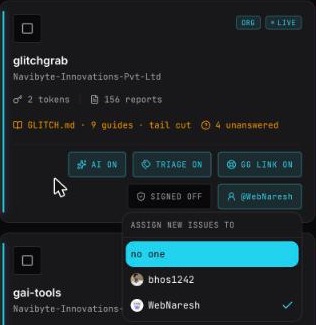
- The ASSIGN NEW ISSUES TO menu lists everyone GitHub allows to be assigned on this repo. Tick each person you want. Each tick saves immediately — there is no Save button.
- You will see New issues on <repo> go to @alice, @bob.
To stop assigning, tick no one: New issues on <repo> land unassigned.
Only new issues are affected. Existing issues keep whoever they had.
Set assignees for many repos at once
- On Repos, tick the checkbox at the top left of each card you want — or press SELECT ALL.
- A bar appears: N selected. Press assign all to….
- Pick the people and press apply to N repos.
- You will see N repos now assign new issues to …. If some repos could not take those people, a second line lists them: Skipped N: repo (reason).
Press clear to drop the selection.
Limits and messages
- At most 10 people per repo — GitHub allows at most 10 assignees on an issue.
- Install the GitHub App on this repo before setting an assignee — install the App first (see Connect your GitHub org).
- <login> cannot be assigned issues on <owner/name> — that person has no access to the repo on GitHub. Add them as a collaborator or to the org, then try again.
- No one on GitHub can be assigned issues here. — the App is not installed, or the repo has no collaborators.
If someone loses access later
GitHub quietly ignores an assignee who can no longer be assigned. Glitchgrab notices when GitHub rejects the issue for that reason and files it again without assignees, so a stale name never costs you a bug report. Remove the person from the menu when you see issues arriving unassigned.
Related
- Get WhatsApp alerts for your issues — the assigned developer can get a message when an issue lands.