Calls
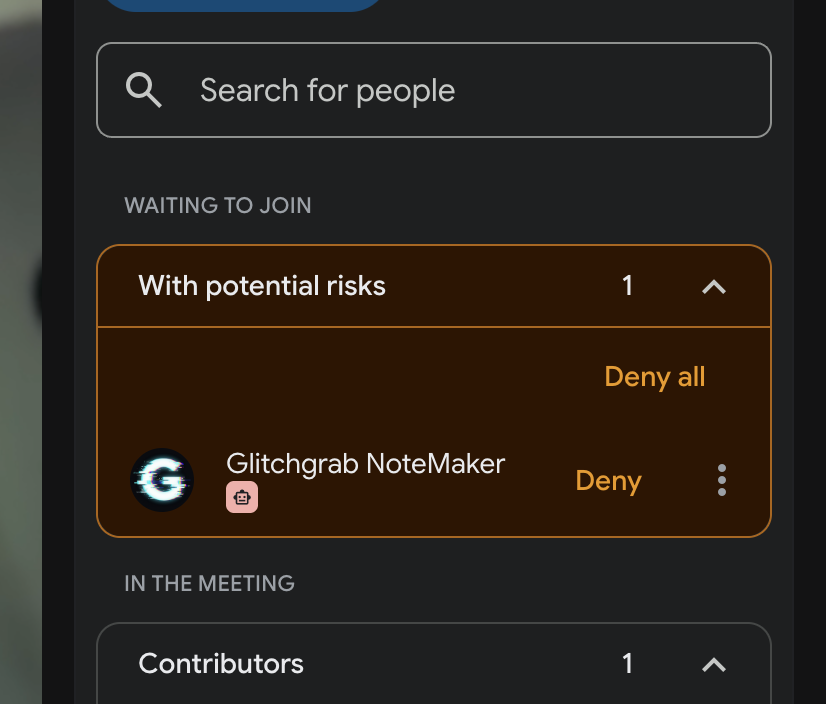
Why Meet lists the bot under "With potential risks"
Why Google Meet puts the Glitchgrab bot in Waiting to join → With potential risks with only a Deny button, how to admit it, and how to skip the warning
Steps checked October 21, 2026
Since March 2026, Google Meet splits the people waiting to join a call into two lists. Anyone Meet can't confirm goes under With potential risks, and that includes every recording or note-taking bot, not only Glitchgrab's. That list shows Deny and Deny all and has no Admit button.
This doesn't mean anything is wrong with the Glitchgrab bot. Otter, Fireflies and other note-takers end up in the same list.
Let the bot in
- In the Meet call, open People.
- Under Waiting to join → With potential risks, find Glitchgrab NoteMaker.
- Click the ⋮ next to its name. Don't click Deny.
- Choose Admit.
If someone presses Deny or Deny all, the bot is turned away and nothing gets recorded. Send it again from Send the bot to a call.
The bot waits 10 minutes. After that you see Timed out waiting to be admitted to the meeting.
The bot never shows up in People
If nobody appears under Waiting to join or With potential risks after a couple of minutes, the bot did not get as far as asking to join.
- Hover the Glitchgrab button in Meet, or open Calls → the call.
- Look for Bot failed: <reason>. That is why it stopped. Nothing more is on its way, so don't keep waiting.
- Send it again. If the same reason comes back, report it with the Glitchgrab button so the team can see it.
Sent from the Glitchgrab button in Meet
If you sent the bot with the Glitchgrab button in the same Meet tab, Glitchgrab tries to admit it for you while that tab stays open. If the bot is still waiting after a few seconds, admit it yourself using the steps above.
Skip the warning
Meet trusts guests who are already on the meeting invite. The bot's Google account is glitchgrab.notetaker@gmail.com.
Glitchgrab adds that account to the guest list for you when both of these are true:
- your Google Calendar is connected (see Record calls automatically with Google Calendar), and
- the call is an event on that calendar that you organised.
Guests don't get an email when the bot is added.
Glitchgrab can't add it when:
- someone else organised the call. Only the organiser can change the guest list, so ask them to add glitchgrab.notetaker@gmail.com as a guest.
- the call isn't on your calendar, for example an instant meeting started from New meeting. For these calls the bot always waits under With potential risks.
You can also add glitchgrab.notetaker@gmail.com as a guest yourself when you create the event.