Your users
Collect star ratings from your users
Ask your users for 1–5 star feedback with FeedbackButton, review it on the Feedback page, and publish the best ratings back into your app
Steps checked September 12, 2026
Bug reports tell you what is broken. Feedback tells you how people feel about your app: a 1–5 star rating with an optional message. Glitchgrab stores it for you — no table, route or migration on your side — and you choose which ratings to show back in your app, for example on a testimonials wall.
Feedback never becomes a GitHub issue.
Before you start
- The
glitchgrabSDK in your app, with agg_token (see Add Glitchgrab to your Next.js app).
1. Ask for ratings
Add the button — it opens a small star-rating dialog:
import { FeedbackButton } from "glitchgrab";

<FeedbackButton />                                          // floating "Feedback" button, bottom-left
<FeedbackButton position="bottom-right" label="Rate us" />

// Your own trigger
<FeedbackButton>
  {({ onClick }) => <button onClick={onClick}>How are we doing?</button>}
</FeedbackButton>
Or open the same dialog from anywhere with useGlitchgrab().openFeedbackDialog().
Prefer your own UI? Send a rating directly:
const { sendFeedback } = useGlitchgrab();

<button onClick={() => sendFeedback(5, "Loved the new export flow")}>5★</button>
sendFeedback never throws; it returns null if the rating could not be saved.
Pass a session to GlitchgrabProvider so you know who left each rating.
2. Read ratings in the dashboard
Open Feedback in the left sidebar (owners only).
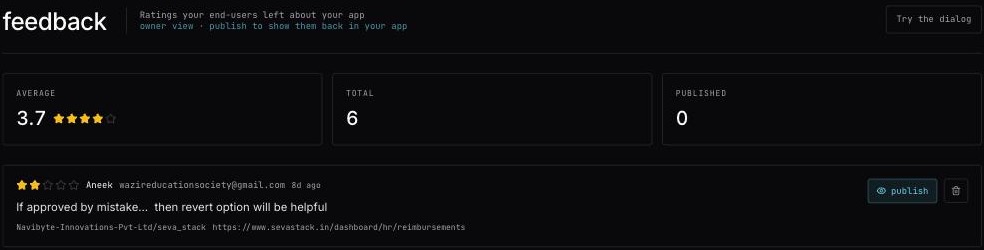
- AVERAGE, TOTAL and PUBLISHED at the top.
- One row per rating: the stars, who left it, their message, how long ago, the repo and the page they were on.
- With more than 10 ratings, filter by repo and by 5★ … 1★.
- Try the dialog — see what your users see.
3. Publish the ones you want to show
Nothing is shown back in your app until you say so.
- Press publish on a rating — Published to your app.
- Press unpublish to hide it again — Hidden from your app.
- Trash icon → delete for good removes it (Feedback deleted).
4. Show published ratings in your app
import { useGlitchgrabFeedback } from "glitchgrab";

function Testimonials() {
  const { feedback, isLoading } = useGlitchgrabFeedback({
    token: process.env.NEXT_PUBLIC_GLITCHGRAB_TOKEN!,
    approvedOnly: true,
    minRating: 4,
  });

  if (isLoading) return null;

  return feedback.map((f) => (
    <blockquote key={f.id}>
      {f.message} — {f.reporterName} ({f.rating}★)
    </blockquote>
  ));
}
With approvedOnly: true, only ratings you pressed publish on are returned — an unvetted complaint can never appear on your testimonials wall. Emails and phone numbers are never included, so the result is safe to show publicly.
From your server or another stack
# Save a rating
curl -X POST https://glitchgrab.dev/api/v1/sdk/feedback \
  -H "Authorization: Bearer gg_your_token" -H "Content-Type: application/json" \
  -d '{"rating": 5, "message": "Great support", "pageUrl": "https://app.example.com/billing"}'

# Read published ratings of 4 stars and up
curl "https://glitchgrab.dev/api/v1/sdk/feedback?approved=true&minRating=4" \
  -H "Authorization: Bearer gg_your_token"
Messages
- rating must be an integer between 1 and 5.
- Rate limit exceeded — too many ratings from one token in a short time.
- no feedback yet — nobody has rated yet; add
<FeedbackButton />to your app.