Reports and issues
File a bug from the dashboard chat
Describe a bug, paste screenshots or speak it in Chat, and turn it into a GitHub issue on any repo — no SDK needed
Steps checked September 12, 2026
Chat is the quickest way for you and your team to file a bug yourselves: describe it, paste a screenshot, press Enter, and it becomes a GitHub issue. No SDK needed.
Who can use it
Owners and members. Owners can file into any repo synced to the org; members into repos they can access on GitHub.
File a bug
- Open Chat in the left sidebar.
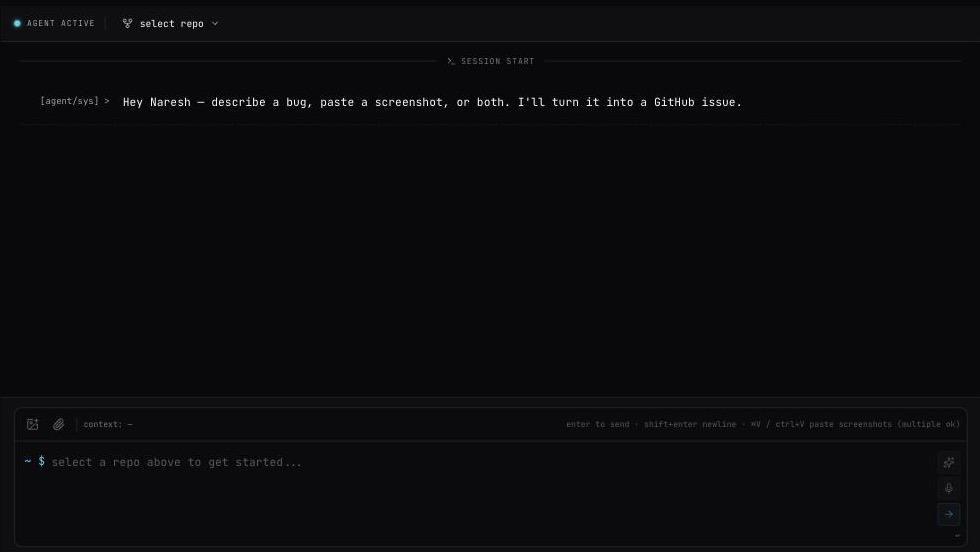
-
Press select repo at the top and pick the repo. Type in Search repos... if you have many. Until you pick one, the box says select a repo above to get started....
-
Describe the problem in the box at the bottom — type it, or paste an error log.
-
Add screenshots, any of these ways:
- paste them with ⌘V / Ctrl+V — several at once is fine;
- drag them onto the chat (drop to attach);
- press the image button (Attach screenshots (multiple allowed)).
Staged images show as staged (N). Press Annotate on a thumbnail to mark it up.
-
Documents — PDF, DOC, DOCX up to 10 MB each — go through the paperclip (Attach docs).
-
Press Enter, or the arrow button. Shift+Enter adds a new line.
You will see creating issue..., then Issue created: <title> with View on GitHub, and the toast Issue created.
Helpers in the box
- Sparkle button — AI enhance — polish your text. Tidies grammar and clarity without inventing details. Afterwards choose Keep or Restore.
- Microphone — speak instead of typing. You can also hold Space to talk. It shows REC — speak now, then transcribing….
Good to know
- Switching the repo starts a new chat.
- The chosen repo stays in the page address, so a refresh keeps it.
- Send text without a new screenshot and the previous message's screenshots are attached again.
- Chat has no report types — every message becomes a bug report. For feature requests from users, use the report dialog in your app.
- Press [reset] to clear the session.
Messages
- Select a repo first — pick one at the top.
- <file> — unsupported file type / <file> exceeds the 10MB limit.
- Exception: connection failed. Please retry. — press Retry.
- Provide a description, screenshot, or document — the message was empty.
- GitHub App not installed on this repo — reconnect in Connect Repo to grant access — install the App from Repos → install app (there is no Connect Repo screen). See Connect your GitHub org.
- No repos synced yet. Go to Settings → Sync Repos. — press Sync org repos on the Repos page.
- No repos assigned to you yet. Ask your org owner to assign repos. — you have no access to any repo on GitHub.