Your users
Keep a project's memory with Context
Turn call notes and past bug reports into a searchable record of what a client asked for, decided, complained about and was promised
Steps checked September 12, 2026
Context is a project's memory: what the client asked for, what you decided, what they complained about, and what you promised. Glitchgrab pulls these out of pasted call notes and past bug reports, so months later you can answer "didn't we agree to that in March?" in seconds. The AI report assistant also reads the newest items when it helps someone report a bug.
Who can see it
Only the repo owner and people granted Context access to that project (see Add team members and give them access). Being in the org is not enough — client decisions and promises are sensitive.
Open Context
Open Context in the left sidebar.
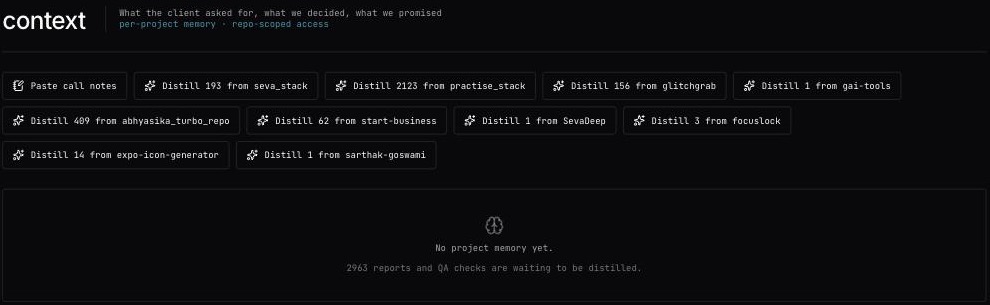
Each item shows:
- its kind — DECISION, REQUEST, COMPLAINT, COMMITMENT or FACT;
- the text;
- where it came from — bug report, qa check, pasted notes or client call;
- when it happened, the project, and N% confidence when Glitchgrab was less than sure.
With more than 10 items, filter by kind (all kinds) and by project (all projects).
Paste call notes
Anything written down about a project — call notes, a WhatsApp thread, an email — can become memory.
- Press Paste call notes.
- Project — pick the project.
- When it happened — the date of the call or conversation (defaults to today). The timeline is sorted by this.
- Notes — paste the text. Decisions, requests, complaints and promises are pulled out; everything else is dropped. Nothing is invented — every item traces back to words in this text.
- Press Distill (Distilling…).
You will see N items added, or Nothing durable in those notes — nothing was added.
Pull memory out of past reports
When a project has bug reports or QA checks that haven't been read yet, a button appears: Distill N from <project>. Each press reads the next 10. You will see N items added · M sources left, and keep pressing until none are left. If nothing is ready yet, the page says N reports and QA checks are waiting to be distilled.
Recorded calls feed the same memory.
Remove an item
Press the trash icon on the item, then sure?. You will see Removed.
Messages
- Paste some notes first — the notes box needs at least a few sentences.
- Notes too long — split them into smaller pastes.
- Distillation limit reached. Try again after <time>.
- No projects you can store context against. — you don't own a project and haven't been granted access to one.
- Could not load project context. — try again; if it persists, tell Glitchgrab.