AI features
Label issues with AI triage
Turn on AI triage so each new issue gets a gg: label for the kind of problem, and correct a wrong label
Steps checked October 26, 2026
AI triage reads each new report and adds one gg: label to its GitHub issue saying what kind of problem it is — a wording mistake, a layout glitch, wrong data, a crash. You can then filter issues on GitHub, route them to the right person, or point an agent only at the kinds it handles well.
It also adds a model: label suggesting which AI coding model should take the fix (see below). That is a cost hint only — it never decides whether a fix is safe to merge. That depends on your code and your risk appetite, which Glitchgrab cannot see.
Before you start
- You own the repo.
- It is off by default — it sends reporters' screenshots and text to a model, so only the owner can turn it on.
Turn it on
- Open Repos in the left sidebar and find the repo's card.
- Press TRIAGE OFF. It changes to TRIAGE ON and you see Triage on — new issues get a gg: label for what kind of problem they are.
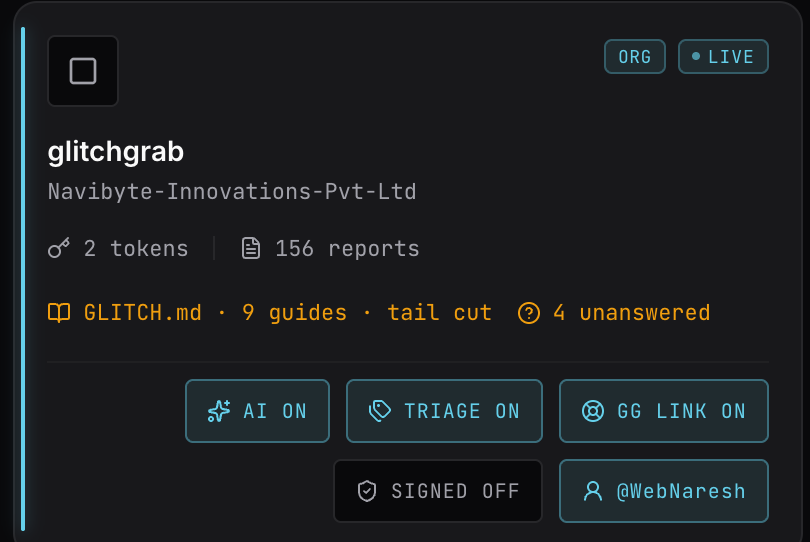
Only issues filed from now on get a label. Existing issues are not relabelled.
When the label appears:
- A report written with the AI report assistant gets its labels the moment the issue is created — the assistant already worked out the type while it was talking to the reporter.
- Every other report (automatic error capture, the plain form, MCP, GlitchRecord) gets its labels shortly after the issue is created. Triage runs after the issue exists, so a slow or unavailable model never delays or blocks a bug report.
What each label means
| Label | The report is about |
|---|---|
gg:copy | Wording, labels, or a value shown as text |
gg:visual | Layout, spacing, size, colour, overflow, truncation |
gg:content-missing | The screen loads but something expected is blank or absent |
gg:logic | Wrong behaviour — a wrong state change, a bad filter result, an action that does nothing |
gg:data | A wrong or inconsistent value, count or record |
gg:crash | An error, exception, or a blank or broken page |
gg:access | Permissions, roles or signing in |
gg:performance | Slow, hanging or timing out |
gg:feature | Asks for something that does not exist yet |
gg:video | A request for a demo video to be made, usually with a script pasted in — not something to fix |
gg:unclear | Not enough to tell — also used when the model is not confident |
A second label, gg:surface, is added when the report is only about what is shown on screen and makes no claim about what the system calculated or stored. It is the most useful signal for "this is probably a front-end-only change".
Video requests
Your own team (owners and QA testers on the dashboard, and anyone using the Chrome extension) also sees a Video script choice in the report dialog. A report sent with it is labelled gg:video straight away and skips triage, so it can never be relabelled a feature. A gg:video issue gets no model: label: nobody should start a coding agent on it. A video editor makes it in GlitchRecord instead — see Add a QA tester → What a video editor sees.
Which model should fix it: model:sonnet / model:opus
Every triaged issue except a gg:video one also gets one of:
| Label | Means |
|---|---|
model:sonnet | A small change the report fully spells out, with nothing left to decide — different wording, spacing, colour, an element added or removed, one clear fix on one screen |
model:opus | Needs a decision or real reasoning — the right behaviour is not stated, it touches money, permissions or stored data, several screens, or it is a feature to design |
When unsure it picks model:opus, and gg:unclear is always model:opus. Use it to send easy fixes to a cheaper model: the gai CLI reads it and starts Claude Code on that model. It is a suggestion about cost, not permission for an agent to merge anything.
Filed through Claude with the Glitchgrab connector? Claude can set the model itself. Triage then keeps that choice and adds only its gg: type label.
Correct a wrong label
Every correction is saved and used to improve the triage instructions, so it is worth the ten seconds.
- Open Reports in the left sidebar.
- On the report's card, press its type chip — it shows the type, plus
·surfaceand the model when they apply (for examplecopy ·surface ·sonnet). The tooltip says Triaged as "…". Click if that is wrong. - In wrong type?, pick the right type — or leave not sure what it should be.
- In the note, say why it was wrong: Why was it wrong? This is the part that improves the prompt. The reason matters more than the new type. If only the model pick was wrong, say so in the note.
- Press save. You will see Noted — this goes into the next triage prompt rewrite.
The label on GitHub is not changed by this — edit it there too if you rely on it.
Coding agents can do the same with the correct_triage tool of the Glitchgrab MCP server.
Turn it off
Press TRIAGE ON. You will see Triage off — new issues are filed unlabelled. Labels already added stay on their issues.