Getting started
Limit a token to your own websites
Set allowed domains on a gg_ token so a copied token cannot use the AI features from another site
Steps checked September 12, 2026
Your gg_ token ships in your app's JavaScript, so anyone can copy it and paste it into another website. Allowed domains makes the paid browser features — the AI assistant, AI enhance, voice input and the "already reported?" check — refuse to work from any site that is not yours.
What it does and does not do
- Does: blocks the token from being used by a web page on a site you did not list.
- Does not: stop a server-side script. A script can fake the
Originheader a browser sends, so this is protection against copy-paste, not against a determined attacker. For that, also turn on Require signed-in users for AI features. - Never blocks report filing from your server (
glitchgrab/server), the MCP server or CI. They send no browser origin, so bug reports keep arriving whatever you set here. localhostalways works, so local development is unaffected.
Set it up
You must own the repo the token belongs to. Anyone else can open the dialog but only sees the list.
- Open API Tokens in the left sidebar.
- On the token's row, press the chip next to ACTIVE. It reads any site when nothing is set, or 1 site / 2 sites when it is.
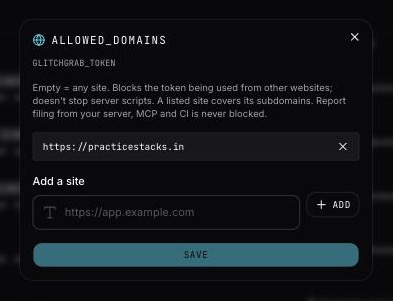
- The allowed_domains dialog opens. Under Add a site, type your site — for example
https://app.example.com— and press Add.- You can paste a full page URL; only the site part is kept.
- A listed site also covers its subdomains:
https://example.comallowshttps://app.example.com.
- Repeat for each site that runs your app (production, staging, a marketing site with the report button).
- Press Save.
You will see Token limited to 2 sites (or however many you added).
Allow any site again
Open the same dialog, press × next to every site, and press Save. You will see Any site can use this token again.
Limits and messages
- Up to 20 sites per token — At most 20 sites per token.
- Use a site like https://app.example.com — the value was not a web address. Include
https://. - Already in the list — that site is already allowed.
- Only the repo owner can change which sites may use this token. — ask the person who owns the repo.
After you save
A browser on a site you did not list gets the AI features switched off for that request. The reporter still sees the plain report form and can still send the report — nothing is lost, they just don't get the assistant.
If your own site suddenly loses the AI assistant after you set this, check the exact address: https://www.example.com and https://example.com are different sites unless you list the parent domain.