Integrations
Send issue and call events to your webhook
Get a signed POST to your own URL when an issue is created, updated, closed or commented on, a call ends, is recorded or summarised, or a customer follow-up gets a note or a new next call — for all projects or just one — and verify the X-Glitchgrab-Signature
Steps checked October 29, 2026
A webhook sends a POST to your own server whenever something happens to an issue Glitchgrab filed, a call it recorded, or a customer follow-up — so you can post to Slack, update your own tracker, or notify a customer when their bug is fixed.
Before you start
- You are the org owner.
- An HTTPS endpoint on your server that accepts JSON POSTs.
1. Add a webhook
- Open Settings in the left sidebar and find Webhooks.
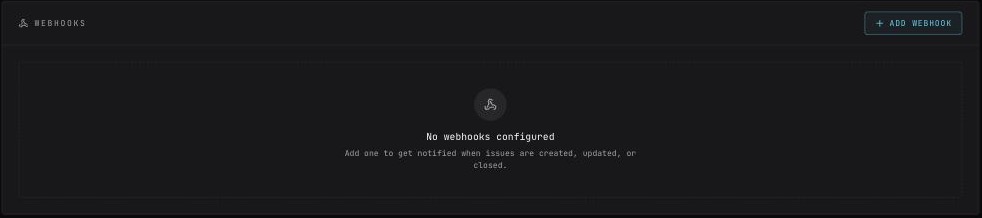
- Press Add Webhook.
- Webhook URL — your HTTPS endpoint, e.g.
https://example.com/webhooks/glitchgrab. - Project — leave it on All projects to get every project's events, or pick one project so a product's own backend gets only that project's issues and calls.
- Events — tick what should trigger a POST:
- Issue Created
- Issue Updated
- Issue Closed
- Developer Commented on GitHub
- Phone Call Started
- Phone Call Answered
- Phone Call Ended
- Call Recording Ready
- Call Summary Ready
- Customer KYC Status
- Customer Line Ready
- Follow-up Note Added
- Follow-up Next Call Changed
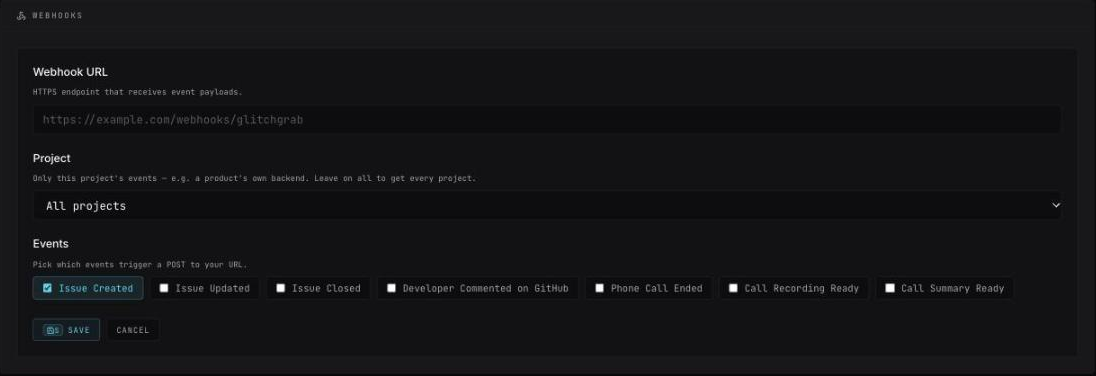
- Press Save. You will see Webhook created.
- The Webhook Secret — copy now, won't be shown again appears. Copy it into your server's environment. You need it to check that requests really come from Glitchgrab.
The list shows each webhook's project (or all projects) next to its events.
Or add it from your own server
A product can register its own webhook with the project's server key, so nobody opens Settings:
import { registerWebhook } from "glitchgrab/server"; // GLITCHGRAB_CALLS_KEY=ggc_…

const r = await registerWebhook({
  url: "https://example.com/webhooks/glitchgrab",
  events: ["call.completed", "phone.line_ready"],
});
if (r.ok) saveSecret(r.secret); // shown once
It is scoped to that project and shows in Webhooks like any other. Only https URLs on a public host are accepted, and at most 5 per project. listWebhooks and removeWebhook list and remove them.
2. What you receive
Every delivery is a POST with Content-Type: application/json and this shape:
{
  "event": "issue.created",
  "timestamp": "2026-09-12T09:30:00.000Z",
  "data": { }
}
| Event | Sent when | Fields in data |
|---|---|---|
issue.created | Glitchgrab opens a GitHub issue from a report | issueUrl, issueNumber, labels, severity, repo |
issue.updated | the issue changes on GitHub, including being reopened | issueUrl, title, action (e.g. reopened), glitchgrabIssueId |
issue.closed | the issue is closed on GitHub | issueUrl, title, glitchgrabIssueId |
issue.commented | a developer comments on the issue on GitHub | issueUrl, title, comment (body, author, authorAvatar, createdAt), glitchgrabIssueId |
call.started | an outgoing call is placed and the caller's phone is ringing | callId, repoId, lineId, direction, peer, ringing |
call.answered | the other side picks up and the recording starts | callId, repoId, lineId, direction, peer, answeredAt |
call.completed | a phone call on one of your project's numbers ends, answered or not | callId, repoId, lineId, direction, peer, status, missedBy, durationSec, hangupCause |
call.recording_ready | a phone call's recording is stored | callId, repoId, direction, peer, durationSec |
call.summary_ready | any recorded call (phone or Meet) gets its summary | callId, repoId, recorder, title, summary |
phone.kyc_status | a customer's KYC changes at the phone provider | ownerId, status, reason |
phone.line_ready | a customer's number was rented and their line created | ownerId, number, lineId |
followup.note_added | a note is added to a customer follow-up — by a person, by your app, or written from a call | followUpId, externalId, body, author, source |
followup.booking_changed | a follow-up's next call is booked, moved or cleared | followUpId, externalId, nextCallAt, bookedBy |
Every call.* event also carries refKey (what your app passed to placeCall, e.g. your client id) and ownerId (the customer whose line carried the call) — both null when not set.
Call events never carry audio links. Fetch the call itself with the project's server key and getCall from glitchgrab/server.
3. Check the signature
Each request carries X-Glitchgrab-Signature: sha256=<hex> — an HMAC-SHA256 of the raw request body using your webhook secret. Reject anything that does not match.
// Next.js route handler
import { createHmac, timingSafeEqual } from "crypto";

export async function POST(request: Request) {
  const body = await request.text(); // the raw body, before JSON.parse
  const expected =
    "sha256=" + createHmac("sha256", process.env.GLITCHGRAB_WEBHOOK_SECRET!).update(body).digest("hex");
  const received = request.headers.get("x-glitchgrab-signature") ?? "";

  const ok =
    received.length === expected.length &&
    timingSafeEqual(Buffer.from(received), Buffer.from(expected));
  if (!ok) return new Response("bad signature", { status: 401 });

  const { event, data } = JSON.parse(body);
  // ... handle the event
  return new Response("ok");
}
Compute the signature over the body exactly as received. Parsing and re-serialising the JSON first changes the bytes and the check fails.
Delivery rules
- Answer with any
2xxstatus within 10 seconds. - A failed or slow delivery is retried once, then dropped. Glitchgrab does not queue deliveries for later — make your endpoint quick, and do slow work after responding.
- Redirects are not followed — point the webhook at the final URL.
- Deliveries never go to a private or internal address (localhost,
10.x,192.168.x, cloud metadata and similar), even if a public name resolves to one. - Requests come with
User-Agent: Glitchgrab-Webhook/1.0.
Remove a webhook
Delete it from the list in Webhooks — Webhook deleted. The Danger zone below can remove all webhooks at once.
Messages
- Please enter a webhook URL.
- Select at least one event.
- Pick a project you own — the project chosen is not one you own.
- Failed to delete webhook — try again.
- url must be a public https URL — from your own server: the URL is http, an IP address or an internal host.