Integrations
Track Google indexing with Search Console
Connect Google Search Console properties to see indexed pages, ask Google to re-crawl pages that are not indexed, and file indexing issues
Steps checked September 12, 2026
If Google has not indexed a page, nobody finds it in search. SEO connects your Google Search Console properties to Glitchgrab so you can see how many of your pages are indexed, ask Google to re-crawl the ones that are not, and turn indexing problems into GitHub issues.
Before you start
- You are the org owner.
- Your site is already verified in Google Search Console, under a Google account you can sign in to.
1. Connect a property
- Open SEO in the left sidebar.
- Press Connect New Property. The Connect Google Account window opens.
- Connect here — sign in to Google in this browser.
- Copy link — for a Google account that lives in another browser: Paste in incognito or a different browser. Valid 10 min.
- Allow access in Google.
- On Connect GSC Properties, tick each site you want, and for each one choose Select repo (required) — the repo that indexing issues for that site should go to.
- Press Connect N properties.
You will see N properties connected, then GSC properties connected successfully.
2. Read a property
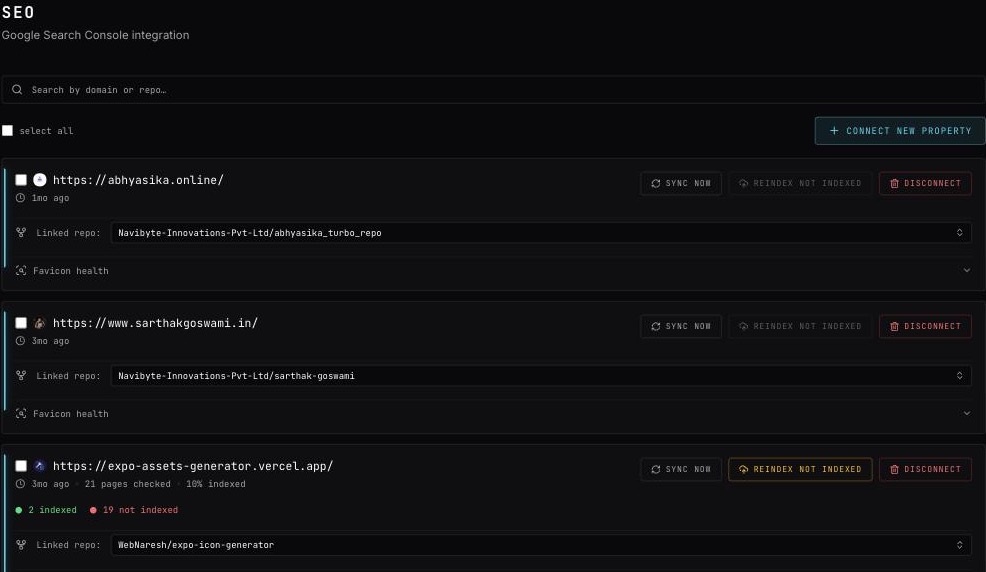
Each connected property shows:
- when it was last synced, and N pages checked · X% indexed;
- N indexed and N not indexed;
- Linked repo: — where issues for it go (change it with the picker);
- Favicon health.
Press Sync Now to fetch fresh numbers from Search Console — Syncing <domain> with Google Search Console….
Use Search by domain or repo… to find one property, and select all to act on several.
3. Ask Google to re-crawl pages
Press Reindex Not Indexed. Glitchgrab reads your sitemap, checks each page, and submits the ones that are not indexed to Google.
You will see Submitted N URLs for re-indexing. The button is greyed out when there is nothing to submit.
Google allows about 200 submissions a day, so a large site may take several days.
4. Look at one property in detail
Click the property to open its detail page:
- the Indexed count;
- Reindex N to submit its not-indexed pages;
- Create GitHub issue — files the indexing problems into the linked repo. The tooltip Link a repo first means the property has no repo yet.
The nightly SEO health issue
Every night Glitchgrab checks each linked site and, when something is wrong, files one Health issues found for <site> issue in the linked repo.
Search Console's "not indexed" list can lag behind the site: it comes from an old crawl, so a page you already fixed can still be on it. Before filing, Glitchgrab opens every listed page the way Googlebot would. If all of them return 200, have no noindex, point to themselves as the canonical page, are not blocked by robots.txt and are listed in your sitemap, no issue is filed. If an issue is already open, Glitchgrab adds a comment saying every page was checked and closes it.
If even one page fails, or Search Console only lists example pages, the issue is filed or updated as usual. Favicon and social-tag problems are always reported.
This issue is for your team only. It never appears in a QA tester's To verify list.
Use it from your AI agent
With the Glitchgrab MCP server connected (see Connect your AI agent to Glitchgrab (MCP)), an agent can call get_indexing_status, list_not_indexed_pages and request_reindex for you. These need your own sign-in, not a repo token.
Remove a property
Press Disconnect and confirm Disconnect property?.
Troubleshooting
- GSC connection failed — any problem during connecting shows this one message. Most often the Google account has no verified Search Console properties, or the link was older than 10 minutes. Try again.
- No valid access token. Please reconnect GSC. — Google access expired. Disconnect and connect the property again.
- Properties belong to you, not the org — another owner connects their own.