Integrations
Watch your Chrome Web Store releases
Track your Chrome extension's review state and get a WhatsApp message when a version goes live, is rejected, or sits unsubmitted
Steps checked September 12, 2026
Submitting a Chrome extension to the Chrome Web Store is not the end of a release: review takes hours or days, and a rejection or a forgotten draft is easy to miss. Extensions watches your store listings for you and messages you on WhatsApp only when you need to do something — when a version goes live, is rejected, or sits unsubmitted.
Before you start
- You are the org owner.
- Your extension is published, or at least uploaded, in the Chrome Web Store Developer Dashboard.
- The Google account that owns it.
- A verified WhatsApp number for alerts (see Get WhatsApp alerts for your issues).
1. Connect the Google account
- Open Extensions in the left sidebar.
- In Chrome Web Store access, press Connect Google account (it reads Connect another once one is connected) and sign in with the account that owns the extension.
- For an account in another browser, press Copy link and open it there.
Access is read-only — Glitchgrab can see what the store says about your extensions and nothing else — it cannot publish.
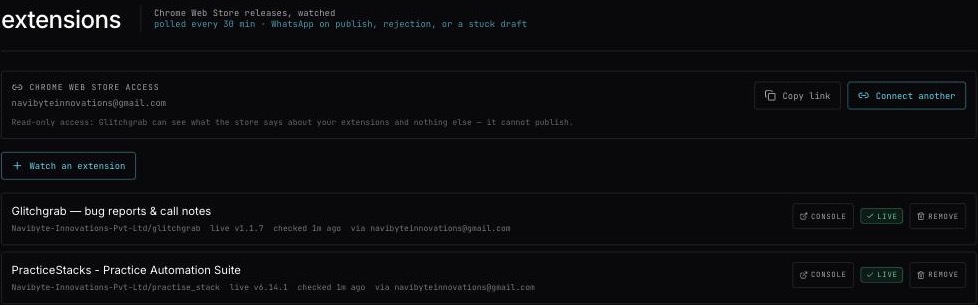
2. Watch an extension
- Press Watch an extension.
- Chrome Web Store link — paste the listing address (
https://chromewebstore.google.com/detail/…) or just the 32-letter extension id. - Name — filled in automatically from the listing (found "…"). An extension that was never published shows No public listing — never published, or still a draft. Name it yourself.
- Project — the repo it belongs to.
- Publisher id — asked only the first time. You find it in the Developer Dashboard.
- Press Start watching. You will see Watching it — the store was read just now.
3. Read the list
Each watched extension shows:
- live vX — the version users have;
- waiting vY — a newer version waiting in review, if any;
- when it was last checked, and which Google account reads it;
- a console link to its Developer Dashboard page;
- its state:
- live — nothing to do;
- in review — waiting on Google;
- draft — not submitted — uploaded but never sent for review;
- needs attention — rejected, or something else you must act on;
- not read yet — just added.
The store is checked every 30 minutes.
When you get a WhatsApp message
- a new version went live;
- a submission was rejected;
- a draft has been sitting unsubmitted for too long.
Nothing is sent while a version is simply in review.
Stop watching
Press remove, then confirm.