Guides and AI agents
Write guides from your own server
Issue the project's ggc_ server key under API Tokens → Server keys and create, update or delete its guides from your own code or MCP client, without a Glitchgrab login
Steps checked October 6, 2026
You can write a project's guides from your own code (an import script, a CMS hook, your own agent) without a Glitchgrab login. You do it with the project's server key, a secret that lives only on your server. There is one key per project. The same key also reads the calls you share with your client (see Share a call with your client), so you never need a second key for guides.
Why not the gg_ token?
Your gg_ token ships in your app's JavaScript, so anyone can read it. If it could write guides, a stranger could rewrite what every reporter is told. The server key is a separate secret that never leaves your server.
gg_ SDK token | ggc_ server key | |
|---|---|---|
| Where it lives | your app's browser bundle (public) | your server only (secret) |
| Read published guides | yes | yes |
| Read drafts | no | yes |
| Read team-only guides | no | only when you ask (audience=internal) |
| Create, update, delete guides | no | yes |
| Shared calls | no | read and delete |
| Reports, issues, other projects | reports only | no |
Before you start
- You own the project.
- You have somewhere safe to keep a secret: your server's environment variables or your secrets manager.
1. Issue a key
- Open API Tokens in the left sidebar and switch to the Server keys tab. The server key link at the top of the Guides page opens the same tab.
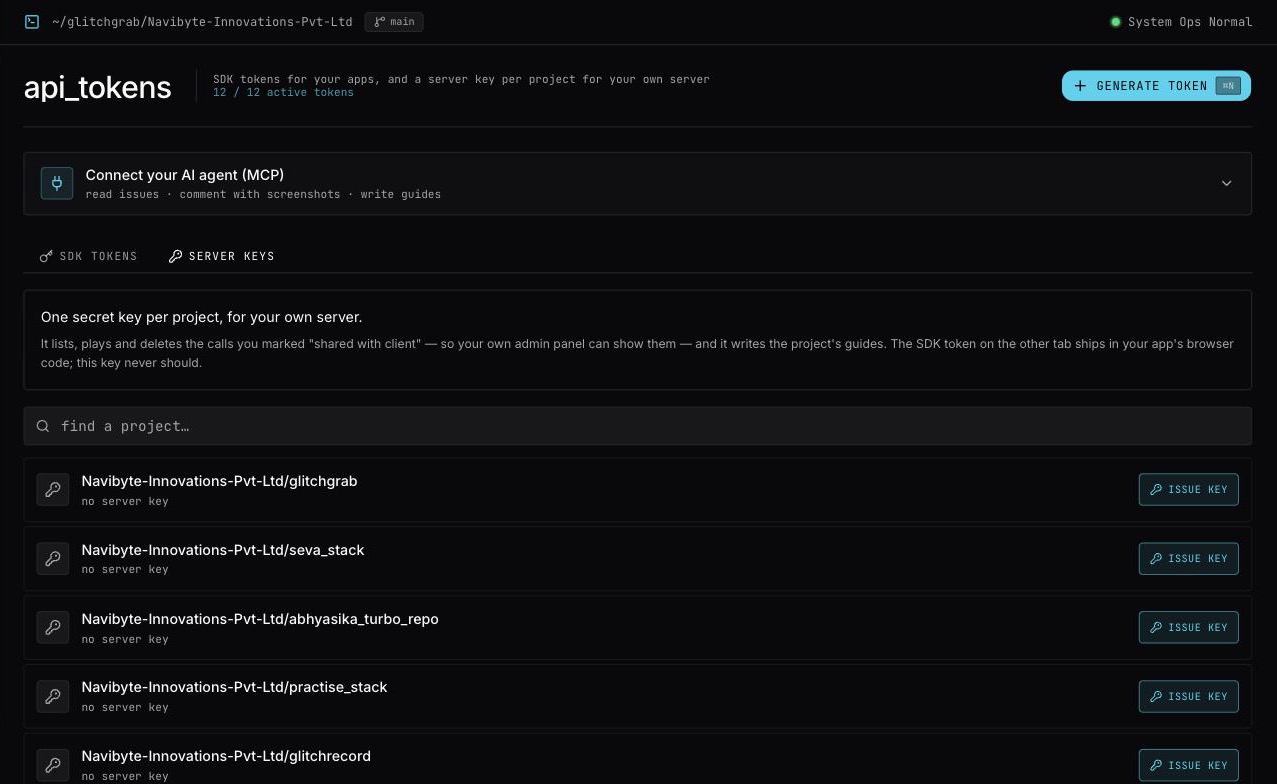
- Find the project. With many projects, type in find a project….
- Press Issue key on its row. The server_key dialog opens.
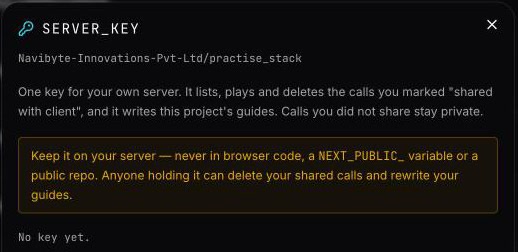
- Press Issue key. You will see Server key issued.
- Copy the key under copy now — shown exactly once into your server environment, for example
GLITCHGRAB_CALLS_KEY=ggc_….
The key is stored only as a hash, so it can never be shown again. If you lose it, press Manage → Issue new key. You will see New key issued — the old one stopped working. Anything using the old key, for guides or calls, stops working at once.
Never put the key in browser code, a NEXT_PUBLIC_ variable, or a public repo.
2. Write a guide
curl -X POST https://glitchgrab.dev/api/v1/sdk/guides \
  -H "Authorization: Bearer ggc_your_key" \
  -H "Content-Type: application/json" \
  -d '{
    "slug": "add-a-client",
    "title": "Add a client",
    "summary": "Create a client and send them the portal invite",
    "content": "1. Open **Clients**\n2. Press **New client**",
    "category": "Clients",
    "status": "PUBLISHED"
  }'
- Guides are matched by slug. If a guide with that slug exists, it is updated and only the fields you send change. Otherwise it is created. Running the same import twice never makes duplicates.
- A new guide needs at least
titleandsummary. If you leave outslug, it is made from the title. statusisDRAFT(the default for a new guide) orPUBLISHED.audienceisPUBLIC(the default) orINTERNAL. AnINTERNALguide is team only: it shows in the Glitchgrab dashboard and over MCP, and the assistant, thegg_token and your public site never see it. Use it for release notes and test plans.- Add
"verified": trueto stamp verified today. contentis markdown. Images must be at a public address.
The response says "saved": "created" or "saved": "updated", and includes the guide, its audience and its link.
Read and delete
# Every public guide, drafts included
curl https://glitchgrab.dev/api/v1/sdk/guides -H "Authorization: Bearer ggc_your_key"

# Team-only guides (use "all" for both)
curl "https://glitchgrab.dev/api/v1/sdk/guides?audience=internal" -H "Authorization: Bearer ggc_your_key"

# One guide, with its markdown and safe HTML (add &audience=internal for a team-only one)
curl "https://glitchgrab.dev/api/v1/sdk/guides?slug=add-a-client" -H "Authorization: Bearer ggc_your_key"

# Delete one
curl -X DELETE "https://glitchgrab.dev/api/v1/sdk/guides?slug=add-a-client" -H "Authorization: Bearer ggc_your_key"
Team-only guides come back only when you ask for them, so a page that renders guides with the server key by mistake still never shows them. From glitchgrab/server, pass listGuides({ token, audience: "internal" }).
Use it from an MCP client
Give the key to an MCP client as its authorization header:
claude mcp add --transport http glitchgrab-guides https://glitchgrab.dev/api/mcp \
  --header "Authorization: Bearer ggc_your_key"
The agent can then use list_guides, get_guide, save_guide, delete_guide, set_guides_base_url and create_image_upload_url (for screenshots) on this project only. Every other tool is refused, including the call tools. Reading calls over MCP needs your own sign-in (see Connect your AI agent to Glitchgrab (MCP)).
save_guide takes audience: "INTERNAL" to write a team-only guide. With the server key, list_guides and get_guide show team-only guides only when you pass audience: "INTERNAL".
Revoke a key
On API Tokens → Server keys, press Manage on the project, then Revoke → Sure? Revoke. You will see Key revoked. Anything still using the key, for guides or calls, gets Invalid server key.
Already have an old guides key (ggw_)?
Projects used to have a separate guides write key starting with ggw_. It keeps working for guides, so nothing you already deployed breaks. It never reaches calls, and new ones are no longer issued.
On the Server keys tab, a project that still has one shows old guides-only key still active. To move over:
- Issue a server key for the project and put it on your server in place of the
ggw_key. - Press revoke old key → sure? revoke. You will see Old guides key revoked.
Messages
- Writing guides needs this project's server key (ggc_…), not the public SDK token. You sent a
gg_token to a write. - Team-only guides need this project's server key (ggc_…): you asked a
gg_token foraudience=internal. - audience is public, internal or all: the
audiencevalue was something else. - Invalid server key: the key was revoked, replaced, or mistyped.
- … a new guide needs at least a title and a summary: you created a guide without them.
- Rate limit exceeded: at most 120 writes are allowed per rate-limit window. Slow the import down.