Integrations
See where ChatGPT and Gemini rank your product
Set up AI answers on the SEO page to check every day where your product comes up when people ask ChatGPT or Gemini "best … software", who comes first, which sites they quote, and get one GitHub issue when you fall behind
Steps checked November 8, 2026
More buyers now ask ChatGPT or Gemini "what is the best software for …" instead of searching Google. AI answers asks those questions for you every day and shows where your product comes up, who is named before you, what the answer says about you and which websites it quoted.
Before you start
- You are the org owner.
- The project is connected to Glitchgrab and the Glitchgrab GitHub App is installed on its repo (that is where the issue goes).
1. Set it up
- Open SEO in the left sidebar and scroll to AI answers.
- If you have more than one project, pick it in the project list.
- Fill in:
- Product name — the name answers use, for example PracticeStacks.
- Questions, one per line (max 8) — what a buyer types, for example best CA management software.
- Competitors, one per line — the products you are compared with. Add other spellings after a |, for example QwikCA|Qwik CA. Your place only counts products on this list, so add every name the answers mention.
- Other names for your product — other spellings and your domain, for example practicestacks.in.
- Line you want answers to repeat (optional) — for example Free plan, unlimited users. Glitchgrab reports how often the sentence about you includes it.
- Check every day — on by default.
- Press Save.
The first check runs within the hour. Press Check now to run it straight away. Answers appear over the next few minutes, and the card shows Checking now: N answers in progress meanwhile.
2. Read the results
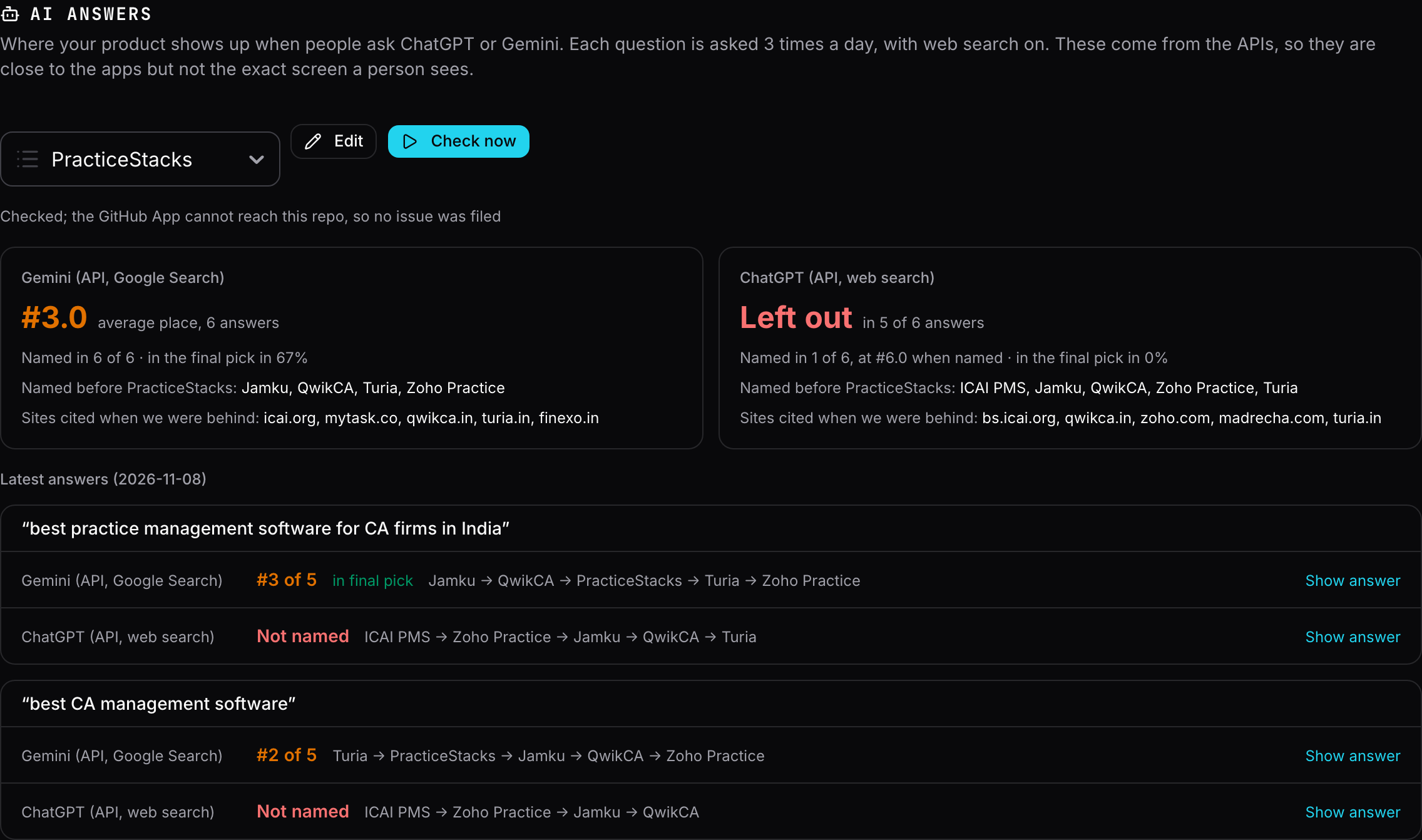
One tile per engine, for the last 7 days:
- #3.0 average place — your place among the products on your list, by where the answer first names them. When you are missing from most answers it says Left out in N of M answers instead.
- Named in N of M and in the final pick in X% — the final pick is the answer's closing recommendation (My recommendation, Final pick…), the part buyers act on. When an engine writes no closing pick, it says so.
- Named before <your product> — who came first.
- Sites cited when we were behind — the pages the answer quoted when you were missing or below 3rd. Getting onto these pages is usually what moves you up.
Under Latest answers, each question shows each engine's place and the order it named products in. Press Show answer for what it wrote about you, the sites it cited, and the full answer.
Each question is asked 3 times a day per engine, because answers change from run to run. The tiles average them.
3. The GitHub issue
When your product is behind in the last 7 days (named in under 75% of answers, average place worse than 3rd, or in the final pick under half the time), Glitchgrab files one [AI ranking] <product> is behind in ChatGPT / Gemini answers issue in the project's repo. It lists your place per engine, who came first, what each answer said about you and the sites it quoted.
- While it is open, Glitchgrab comments only when the picture changes: worse, better, or back near the top.
- After someone closes it, nothing new is filed for 7 days.
- It is for your team only and never appears in a QA tester's To verify list.
4. From Claude (MCP)
Connect the Glitchgrab MCP with your own login (the project owner's), then ask Claude, for example "where does PracticeStacks rank in AI answers?".
- get_ai_answers reads the same results as the card.
- save_ai_answers_setup changes the questions, competitors and other names.
- run_ai_answers_now presses Check now, only after you ask for it, because each check uses your OpenAI credit.
The project's server key, the public repo token and QA testers cannot use these.
Good to know
- These answers come from ChatGPT's and Gemini's own APIs with web search on, asked from India. They are close to what the ChatGPT and Gemini apps show, but not the exact screen a person sees: the apps also use the person's history. Read them as a trend.
- Check now asks each question once a day. Pressed again after today's answers are in, it says Today's answers are already in.
- To stop the daily check, press Edit and switch off Check every day.
Troubleshooting
- No answers yet — the first ones arrive a few minutes after a check starts. Press Check now if you just saved.
- N answers failed today — that engine did not answer. Those are asked again tomorrow.
- the GitHub App cannot reach this repo — install the Glitchgrab GitHub App on the project's repo so the issue can be filed.